FreeTone Calls & Texting
- 4.1
- Rating
- 10.00M
- Installs
- Free
- Price

 Analysis by App-foxy
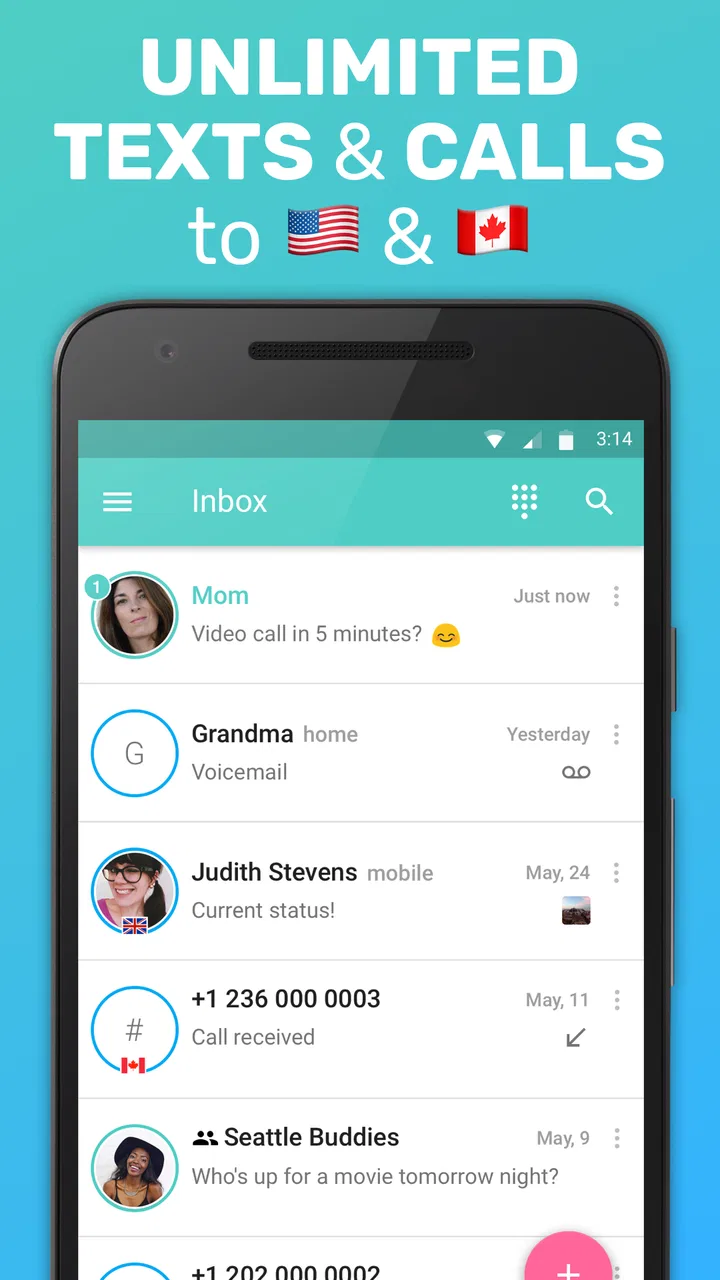
FreeTone Calls & Texting is the kind of social app I would try when I need a separate way to call or text people in the United States or Canada without immediately tying that communication to my usual mobile number. Its main appeal is straightforward: it combines calling, SMS texting, MMS messaging, and a free phone number in one place. I found the idea especially useful for short-term communication, a second line, or keeping everyday conversations apart from my personal number.
The app is free to install, and TextMe, Inc. has built it for a broad audience rather than a niche technical crowd. It sits in the social category, carries an Everyone age rating, and has reached over ten million installs. That level of adoption makes it easier to see why people consider it when looking for an alternative to their carrier’s standard messaging tools. Still, I would not treat it as a complete replacement for every phone service. Its value depends heavily on where you live, who you need to contact, and how much you care about having one dependable number for everything.
What to expect before making your first call
The first thing to understand is the app’s scope. FreeTone is centered on communication within the United States and Canada, with free calling and texting for those destinations. That is a strong fit if your daily contacts are in those regions. If your main goal is international calling outside that area, I would compare other services before making this your primary choice.
You May Also Like

 Blood Strike: 2.5 Anniversary
Blood Strike’s Loadouts Turn Every Drop Into a Tactical Gamble
A close look at Blood Strike’s custom loadouts: how fast access to signature weapons reshapes its battle royale rhythm, rewards preparation, and narrows the gap between fights.

 Pandora - Music & Podcasts
Pandora’s Music Is Easy to Start, but Harder to Recover
Pandora’s strength is its low-effort path from a seed to a station. Its weak spot is how much confidence it asks you to place in connection, setup, and quiet recovery.

 8 Ball Pool
 Is Built on Rivalries, Rematches, and Routine
A close look at the rivalries, rematches, shared routines, and unanswered safety questions that turn a quick pool match into a persistent mobile community.

 Samsung Music
’s Quiet Strength Is Playing What You Already Own
Its reach comes less from spectacle than from dependable access to a personal library. That simplicity is both the app’s strongest retention engine and its ceiling.

 AccuWeather: Weather Radar
AccuWeather Review: A Quick, Clear Forecast for Everyday Decisions
For everyday plans, the best forecast is the one you can understand quickly. AccuWeather makes rain timing, radar, and local conditions easy to act on, with a few trade-offs.

 Hill Climb Racing
Why Hill Climb Racing Still Turns Crashes Into One More Run
A tiny car, a bumpy hill and one more upgrade: Hill Climb Racing keeps resurfacing because its simple chaos makes every near-miss feel personal.
More From Our News Desk



In practical terms, I see it as a flexible communication layer rather than a traditional carrier account. You can use it for conversations that do not need to live inside your normal phone plan, such as contacting a marketplace seller, coordinating with a temporary group, or giving a service provider a number that is separate from your personal one. The separate-number angle is more useful than the basic “free texting” promise because it gives the app a clear role in a person’s routine.
FreeTone has an average rating of 4.2 from roughly 131 thousand ratings, with around 27 thousand written reviews. I would read that as a sign of broad usefulness rather than proof that every experience is smooth. Communication apps are particularly sensitive to device settings, connection quality, number availability, and user expectations, so the same app can feel simple for one person and frustrating for another.
The current version is 3.51.0, and it supports devices running Android 7.0 or later. That makes it accessible to many older Android phones, although I would still keep the operating system and the app updated when possible. A communication tool needs to work reliably alongside notifications, contacts, and the phone’s own audio controls, and older devices can sometimes make those interactions less predictable.
There are optional in-app purchases ranging from $0.99 to $79.99 per item. I would pay attention to the purchase screen rather than assuming every communication need is covered in exactly the same way. The free starting point is attractive, but optional spending can become relevant if you want additional flexibility beyond the basic experience. For a first-time user, my advice is simple: install it, complete the initial setup, and test a real conversation before buying anything.
Who benefits most from the separate number
I think the app makes the most sense for someone who wants a practical boundary between personal communication and a specific activity. Imagine arranging a used desk through a local listing. You may want to exchange messages and coordinate pickup without immediately giving a stranger your everyday number. FreeTone can serve as that middle ground, provided the other person is in the supported calling and texting area and you are comfortable managing the conversation inside the app.
It can also help when traveling within the United States or Canada and trying to avoid using your main number for every temporary interaction. A student, freelancer, roommate, or small seller may appreciate having a communication identity that is easier to separate from family and personal contacts. I would not describe this as a substitute for a business phone system, but it can be a convenient lightweight option for informal work.
Another useful scenario is coordinating a short-lived event. If several people need updates about a move, a volunteer activity, or a weekend plan, keeping those messages in a dedicated app can prevent your personal text inbox from becoming a jumble. The trade-off is that everyone needs to know where to reach you. A second number only helps if you remember to check it and clearly tell contacts which number is active.
Who should choose a different solution
I would hesitate to recommend it as the only communication method for someone who depends on one permanent number for banking alerts, account recovery, work verification, or urgent family contact. A carrier number or another established phone service is usually the safer foundation for those responsibilities. FreeTone is better viewed as an additional channel, not automatically as the number that should replace everything else.
I would also look elsewhere if your conversations are mainly international, if you need a full business phone system, or if your priority is seamless integration with the phone’s default dialer and messaging inbox. Apps in this category can be convenient precisely because they are separate, but that separation can become a nuisance when you expect every call and message to appear in the same place.
People who dislike advertising-supported or purchase-supported communication services should also examine the experience carefully before committing. The app is free, but free does not always mean that every optional convenience is included. I would start with a small, realistic test rather than building an important workflow around it on the first day.
Getting through setup without second-guessing the app
My recommended setup path is to begin with the purpose of the number, not with the number itself. Decide whether you want it for marketplace chats, a temporary project, travel, or a second personal line. That decision affects how you name contacts, where you share the number, and how often you need to check the app. Without that plan, it is easy to create a second inbox and then forget why it exists.
After installing FreeTone, follow the account and number-selection steps shown on screen. Read each prompt instead of rushing through it, especially when the app asks you to confirm communication details. The important result of setup is not merely reaching the home screen; it is knowing which number people should use and how you will recognize incoming calls or texts from this service.
I would then send a message to someone I know in the United States or Canada. Use a contact who can reply quickly, because the goal is to confirm the complete path: your message leaves the app, the recipient receives it, and the response returns to the correct conversation. Testing with a familiar person is much less stressful than discovering a problem while trying to coordinate something time-sensitive with a stranger.
For MMS, I would test a simple picture only after ordinary texting works. That creates a useful distinction if something goes wrong. If basic text succeeds but a picture does not, the issue is easier to isolate than when you test several functions at once. This is one of the small habits that makes a communication app feel more dependable: change one variable at a time.
Calls deserve their own test. Make a short call while you are somewhere with a stable internet connection, and ask the other person whether your voice is clear. Do not judge the service only by whether the call connects. A successful connection with delayed or broken audio is not a successful everyday experience. Testing both directions also helps you notice whether notifications and call controls behave as you expect.
The first meaningful success
For me, the first meaningful success would be completing a short two-way conversation and then finding it again later without confusion. That sounds basic, but it checks several practical details at once: the number is active, the recipient knows where to reply, the conversation stays organized, and you can return to it when needed.
Once that works, create a simple habit for the second line. I would keep a note in my contacts or calendar explaining what the number is used for, especially if it is temporary. I would also tell close contacts not to assume that the FreeTone number is the same as my regular mobile number. Clear labeling prevents the common mistake of sending an important reply to the wrong inbox.
A useful workflow is to reserve the app for one category of communication at first. For example, use it only for marketplace arrangements during the first week. That makes it easy to decide whether the separate number is genuinely reducing clutter or merely adding another place to check. If it helps, expand its role gradually. If it does not, you have avoided moving your entire communication routine before understanding the trade-offs.
I also recommend checking the app at a predictable time if you are using it for non-urgent messages. A second number is only valuable when you can respond. Treating it like an unattended inbox defeats the purpose, particularly when the person contacting you does not know that you are monitoring it less frequently than your main number.
Confusions that can make the experience feel harder
The biggest source of confusion is assuming that a free number behaves exactly like a carrier-issued mobile number in every situation. I would avoid presenting it as your only identity for services that require dependable account verification or expect a traditional mobile line. For ordinary conversations, the distinction may not matter. For sensitive or permanent accounts, it matters a great deal.
Another common misunderstanding is expecting the app to replace the phone’s own messaging habits automatically. FreeTone has its own communication environment, so you need to look for conversations and calls there rather than assuming they will appear in the same inbox as carrier messages. This is not necessarily a flaw; it is the cost of using a separate communication channel. The key is remembering that people may reply to the FreeTone number even when you are focused on your regular messages.
Notifications are worth treating as part of setup, not as an afterthought. If you miss a reply, the problem may be less about the conversation itself and more about how your phone handles app alerts, background activity, or sound settings. I would send a test message while the phone is locked, then confirm that I notice it. That small check is especially important if the app is being used for a pickup, appointment, or time-sensitive plan.
It is also easy to confuse a successful first message with proof that every future message will feel identical. Different networks, devices, and locations can affect calls and texts. I would keep expectations realistic: the app can be useful, but it still depends on the surrounding phone and internet environment. When a conversation is important, leave enough time for a reply instead of waiting until the final minute.
How it compares with ordinary alternatives
Your carrier’s built-in calling and texting remain the simplest choice when you want one familiar number, one inbox, and the least amount of explanation for contacts. FreeTone’s advantage is separation. It gives you a dedicated place for communication that you may not want mixed with personal calls. If convenience means “everything in one place,” the carrier usually wins. If convenience means “a second identity for a specific purpose,” FreeTone becomes more interesting.
Other internet calling and messaging apps may be stronger choices for international communities, large group conversations, or people who already spend most of their time inside a particular social platform. I would choose based on where the people I need to reach already communicate. A technically capable app is not useful if every contact has to be persuaded to install something different or remember a new channel.
FreeTone’s more focused identity can be an advantage for local calling and texting in its supported region. It avoids the need to turn a broad social network into a phone tool. On the other hand, a broader messaging platform may offer a more familiar experience for media sharing, group interaction, or cross-border communication. The right choice depends less on the app’s headline feature and more on the habits of the people on the other end.
Small habits that improve the day-to-day experience
First, label the number’s purpose immediately. I would not rely on memory months later, particularly if I use several communication tools. Second, test both a text and a call before sharing the number widely. Third, keep the first use case narrow so the app remains easy to manage. These steps are simple, but they prevent the separate line from becoming an unorganized duplicate of your main phone.
For marketplace or temporary contacts, I would move the conversation to a normal channel only after trust has been established and there is a good reason to do so. The separate number can reduce unwanted exposure, but it is not a guarantee of privacy or safety. I would still avoid sharing unnecessary personal details and would handle in-person arrangements carefully.
For work, I would use the app for informal coordination rather than treating it as a complete office phone. It can be handy when a project needs a reachable number for a limited period, but permanent business communication usually benefits from clearer ownership, predictable availability, and policies that a lightweight social app may not provide.
Finally, review your purchase choices with the same care you would use for any free app with optional spending. The available in-app purchase range runs from $0.99 to $79.99 per item, so I would not tap through a purchase simply because the initial download costs nothing. Start with the free experience, identify the exact limitation you are trying to solve, and then decide whether paying is worthwhile.
My recommendation after using it as a second communication line
FreeTone Calls & Texting is most convincing when I treat it as a practical second number for calls, SMS, and MMS in the United States and Canada. It can make temporary communication cleaner, keep a marketplace exchange away from my personal number, or give a small project its own contact point. The free entry point and broad Android compatibility make it easy to test without turning the decision into a major commitment.
Its limitations are just as important. I would not use it as my sole number for critical accounts, assume it will replace a carrier service in every situation, or choose it mainly for international communication. The separate app environment requires a little discipline: I need to check it, explain the number to contacts, and test the functions that matter before relying on them.
Overall, I recommend trying it if you have a clear reason for wanting a second communication channel. Install it, complete the number setup, send a test message, make a short call, and use it for one realistic task before expanding its role. If that first small workflow feels natural, FreeTone can be a genuinely useful addition to your phone. If you only want one seamless inbox and one universally trusted number, your regular carrier service or a more integrated alternative will probably suit you better.
FAQs for FreeTone Calls & Texting
01What is FreeTone Calls & Texting and how does it work?
FreeTone Calls & Texting is a mobile application that allows users to make free calls and send texts to any number in the United States and Canada. It operates over a Wi-Fi or data connection, providing an easy way to stay connected without using traditional phone service. Users are assigned a dedicated phone number, which can be used for both calls and texts.
02Is FreeTone really free to use, and are there any hidden costs?
FreeTone is free to download and use for calling and texting within the U.S. and Canada. However, the app may offer additional features or international calling options that incur charges. Users should check the app for any in-app purchases or premium features that they might want to use, which could involve additional costs.
03How is the call quality on FreeTone, and does it depend on the internet connection?
The call quality on FreeTone largely depends on the strength and stability of your internet connection. A strong Wi-Fi or data connection will generally result in clear call quality, while weaker connections may lead to dropped calls or poor audio. To ensure the best experience, users should connect to a reliable network.
04Can I use FreeTone on multiple devices, and how does syncing work?
FreeTone can be used on multiple devices, but syncing between them depends on the app's support for multi-device functionality. Typically, users can log into the same account on different devices to access their messages and call history. However, it's essential to check the app settings for any specific instructions regarding multi-device use.
05What are some common issues users face with FreeTone, and how can they be resolved?
Common issues with FreeTone include connectivity problems, app crashes, or difficulty receiving calls or texts. To resolve these, users should ensure they have the latest version of the app installed, check their internet connection, and restart the app or device if necessary. If issues persist, reaching out to customer support can provide further assistance.
Pros
- Unlimited free calls to the US and Canada.
- No need for a SIM card to operate.
- User-friendly interface for easy navigation.
- Customizable voicemail options.
- Supports group messaging with ease.
Cons
- Ads can be intrusive during use.
- Limited international call availability.
- Requires stable internet connection.
- Some features need in-app purchases.
- Occasional app crashes reported.

FreeTone Calls & Texting
Gallery